Tuesday, 30 October 2018

40. How to override save behaviour for Django admin?


ModelAdmin has a save_model method, which is used for creating and updating model objects. By overriding this, you can customize the save behaviour for admin.
The Hero model has the following field.:
added_by = models.ForeignKey(settings.AUTH_USER_MODEL,
        null=True, blank=True, on_delete=models.SET_NULL)
If you want to always save the current user whenever the Hero is updated, you can do.:
def save_model(self, request, obj, form, change):
    obj.added_by = request.user
    super().save_model(request, obj, form, change)

39. How to add a model twice to Django admin?


You need to add the Hero model twice to the admin, one as a regular admin area, and one as read only admin. (Some user will potentially see only the read only admin.)
If you have try to register the same model twice:
admin.site.register(Hero)
you will get an error like this:
raise AlreadyRegistered('The model %s is already registered' % model.__name__)
THe solution is to sublass the Hero model as a ProxyModel.:
# In models.py
class HeroProxy(Hero):

    class Meta:
        proxy = True

...
# In admin.py
@admin.register(Hero)
class HeroAdmin(admin.ModelAdmin, ExportCsvMixin):
    list_display = ("name", "is_immortal", "category", "origin", "is_very_benevolent")
    ....


@admin.register(HeroProxy)
class HeroProxyAdmin(admin.ModelAdmin):
    readonly_fields = ("name", "is_immortal", "category", "origin",
        ...)

38. How to get Django admin urls for specific objects?


You have a children column displaying the names of each heroes’ children. You have been asked to link each children to the change page. You can do it like this.:
@admin.register(Hero)
class HeroAdmin(admin.ModelAdmin, ExportCsvMixin):
    ...

    def children_display(self, obj):
        display_text = ", ".join([
            "<a href={}>{}</a>".format(
                    reverse('admin:{}_{}_change'.format(obj._meta.app_label, obj._meta.model_name),
                    args=(child.pk,)),
                child.name)
             for child in obj.children.all()
        ])
        if display_text:
            return mark_safe(display_text)
        return "-"
The reverse('admin:{}_{}_change'.format(obj._meta.app_label, obj._meta.model_name), args=(child.pk,)), gives the change url for an object.
The other options are
  • Delete: reverse('admin:{}_{}_delete'.format(obj._meta.app_label, obj._meta.model_name), args=(child.pk,))
  • History: reverse('admin:{}_{}_history'.format(obj._meta.app_label, obj._meta.model_name), args=(child.pk,))

37. How to add a custom button to Django change view page?


Villain has a field called is_unique:
class Villain(Entity):
    ...
    is_unique = models.BooleanField(default=True)
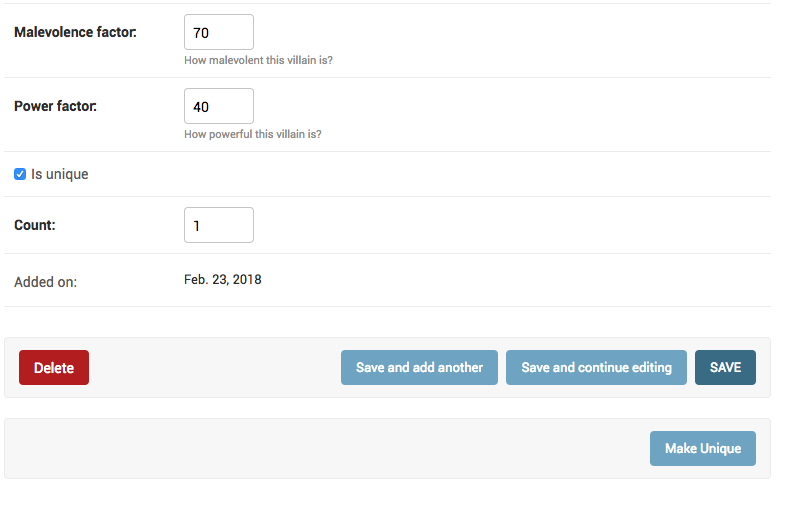
You want to add a button on Villain change form page called “Make Unique”, which make this Villain unique. Any other villain with the same name should be deleted.
You start by extending the change_form to add a new button.:
{% extends 'admin/change_form.html' %}

{% block submit_buttons_bottom %}
    {{ block.super }}
    <div class="submit-row">
            <input type="submit" value="Make Unique" name="_make-unique">
    </div>
{% endblock %}
Then you can override response_change and connect your template to the VillainAdmin.:
@admin.register(Villain)
class VillainAdmin(admin.ModelAdmin, ExportCsvMixin):
    ...
    change_form_template = "entities/villain_changeform.html"


    def response_change(self, request, obj):
        if "_make-unique" in request.POST:
            matching_names_except_this = self.get_queryset(request).filter(name=obj.name).exclude(pk=obj.id)
            matching_names_except_this.delete()
            obj.is_unique = True
            obj.save()
            self.message_user(request, "This villain is now unique")
            return HttpResponseRedirect(".")
        return super().response_change(request, obj)
This is how your admin looks now.
_images/custom_button.png

36. How to change ForeignKey display text in dropdowns?


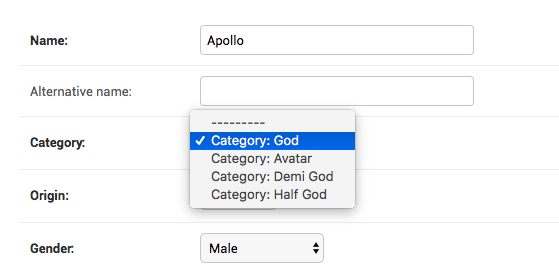
Hero has a FK to Catgeory. In the dropdown, rather than just the name, you want to show the text “Category: <name>”.
You can change the __str__ method on Category, but you only want this change in the admin. You can do this by creating a subclassing forms.ModelChoiceField with a custom label_from_instance.:
class CategoryChoiceField(forms.ModelChoiceField):
     def label_from_instance(self, obj):
         return "Category: {}".format(obj.name)
You can then override formfield_for_foreignkey to use this field type for category.:
def formfield_for_foreignkey(self, db_field, request, **kwargs):
    if db_field.name == 'category':
        return CategoryChoiceField(queryset=Category.objects.all())
    return super().formfield_for_foreignkey(db_field, request, **kwargs)
Your admin look like this.
_images/fk_display.png

35. How to manage a model with a FK with a large number of objects?


You can create a large number of categories like this:
categories = [Category(**{"name": "cat-{}".format(i)}) for i in range(100000)]
Category.objects.bulk_create(categories)
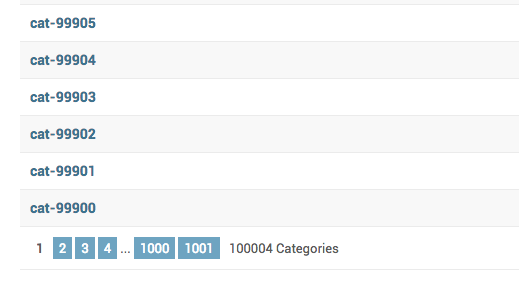
Now as Category has more than 100000 objects, when you go to the Hero admin, it will have category dropdown with 100000 selections. This will make the page both slow and the dropdown hard to use.
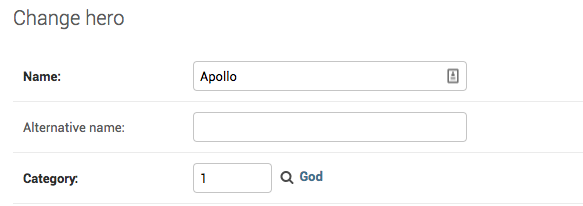
You can change how admin handles it by setting the raw_id_fields:
@admin.register(Hero)
class HeroAdmin(admin.ModelAdmin, ExportCsvMixin):
    ...
    raw_id_fields = ["category"]
This change the Hero admin to look like:
_images/raw_id_fields_1.png
Add the popup looks like this
_images/raw_id_fields_2.png

34. How to filter FK dropdown values in django admin?


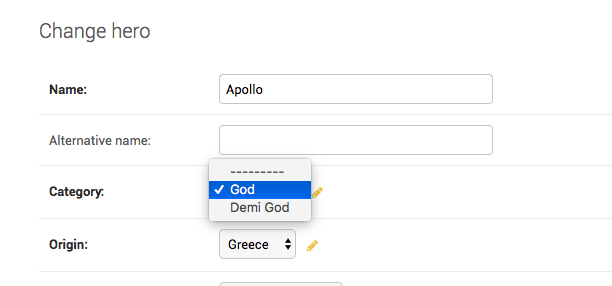
Your Hero model has a FK to Category. So all category objects will show in the admin dropdown for category. If instead, you wanted to see only a subset, Django allows you to customize that by overriding formfield_for_foreignkey:
@admin.register(Hero)
class HeroAdmin(admin.ModelAdmin, ExportCsvMixin):
    ...
    def formfield_for_foreignkey(self, db_field, request, **kwargs):
        if db_field.name == "category":
            kwargs["queryset"] = Category.objects.filter(name__in=['God', 'Demi God'])
        return super().formfield_for_foreignkey(db_field, request, **kwargs)
_images/filter_fk_dropdown.png

Featured post

Text and Design 1. How to change ‘Django administration’ text? 2. How to set the plural text for a model? 3. How to create two indep...

Popular Posts